



 ■How to use SpriteStudio data from UMG
This page shows the steps to lay out and use SpriteStudio data on UMG.
For the information about the SpriteStudio plug-in, please visit this page. For the information about SpriteStudio (main software), please visit this page.
After creating a WidgetBlueprint, select [Ss Player Widget] from the [Palette] to place it.
Just setting the SsProject asset for [SsProject] on the [Details] tab will make it ready.
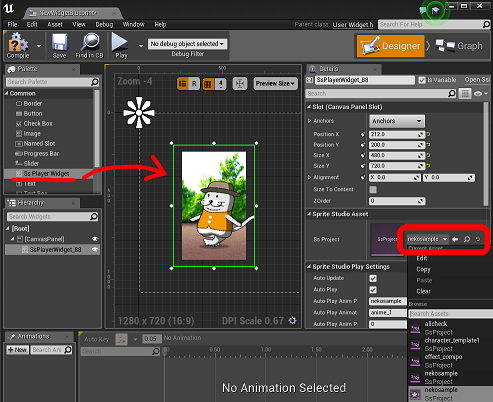
It behaves on UMG in the same way as an Image Widget.
Also, as with an SsPlayer component, it can be controlled from a graph of a WidgetBlueprint.
Its properties and Blueprint functions are almost equivalent to those of the component. However, please note that when using it from UMG, the rendering method is locked to off-screen rendering.
contents
■Tutorials If you newly introduce the plug-in, please refer to the following tutorials first.
・How to intoduce the plug-in to your project
・How to import an SSPJ file
・How to use an SsProject asset from Blueprint
・How to use the plug-in with HUD UMG / Canvas
■Features reference Features reference for Blueprint can be referred to on the following page.
・Property reference
・Blueprint reference
■Tips and others
・Tips & limitations
・Package creation steps
■About SpriteStudio (main software)
Please visit the following official page of Web Technology.
http://www.webtech.co.jp/eng/spritestudio/